

If you’ve ever ended up in an airport queue digging for “that PDF” somewhere between Downloads, WhatsApp and screenshots, you already get the idea behind Passbook—the feature we now know as Apple Wallet: turning your phone into a neat, organized place to store digital passes that are ready to show at exactly the right moment. The concept is simple, but executed extremely well: instead of carrying physical cards or scattered documents, you keep tickets, boarding passes, loyalty cards and more all in one place, with a design that keeps the QR or barcode right at hand when you need it.
On iPhone it’s built into iOS, so this isn’t an “extra” app—it’s part of Apple’s ecosystem, with practical touches like biometric protection (for example, Face ID) and iCloud sync. And yes, while Apple Wallet is exclusive to iOS, the key files behind this system can live beyond the iPhone thanks to compatible apps on Android. Because, in the end, who wouldn’t want a digital wallet that doesn’t feel like a junk drawer?
What Passbook is and why it’s now Apple Wallet
Passbook was the original name for Apple’s digital “card holder.” Over time, that idea evolved into what’s now called Apple Wallet, an app that not only organizes digital passes but also ties into broader Apple features—like payment support when you add cards compatible with Apple Pay.
At its core, Wallet works like a visual wallet: you open the app and see your passes in a card-like format, scroll between them, and quickly access the essentials—usually the QR code or barcode used to enter an event, check in, or validate a ticket. Compared with a traditional PDF, this format prioritizes only what matters, with no menus or pages: pass name, a thumbnail, relevant dates (updates or expiration), and the scannable code.
The key point is compatibility: Wallet is mainly fed by PKPASS files or by “Add to Apple Wallet” buttons you’ll see when buying tickets, booking travel, or managing passes across different services. That’s exactly what has made Apple Wallet a de facto standard for carrying concert tickets, train tickets, or boarding passes without printing anything.
What it’s for: tickets, travel, loyalty—and more
The most common use of Apple Wallet is also the most everyday one: storing tickets. Even if they often arrive as PDFs, having them as passes keeps everything neatly organized in a single app, ready to show in seconds. In practice, the list of things you can carry is pretty broad: concert or festival tickets, plane tickets, train tickets (for example, from Spain’s Renfe), passes for museums or theatres, and tickets for sports events.
Beyond entertainment and travel, there’s one area where Wallet shines through pure pragmatism: loyalty cards, coupons, discounts and gift cards. Digitizing them avoids that classic moment of opening your wallet only to realize the right card is… in another jacket. Plus, with gift cards you can check relevant details like the remaining balance without hunting for old emails or lookup pages.
For flights, the pass format is especially convenient because it lets you see key details at a glance, like flight status and schedules. Is it a revolution? No—but it’s exactly the kind of incremental improvement you appreciate when you’re in a hurry, have poor signal, or your phone is packed with notifications like a Star Trek control panel.
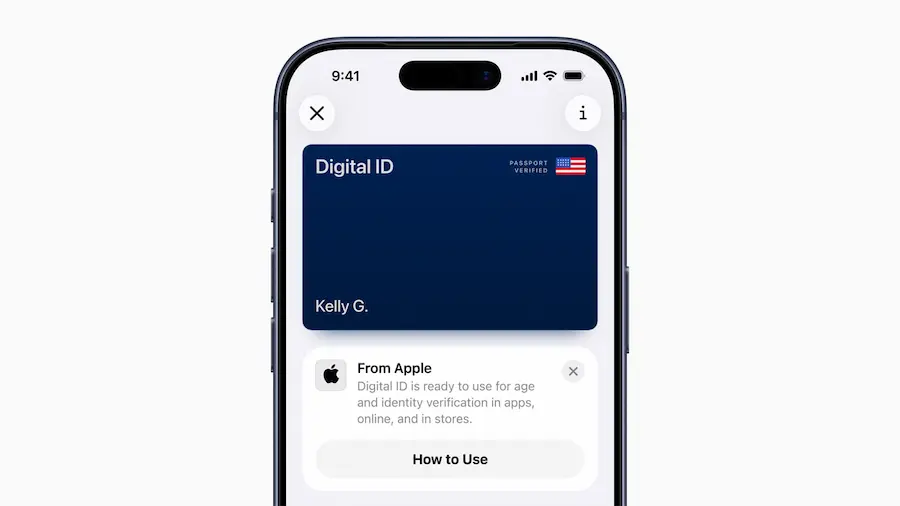
And more recently, Wallet has expanded into a container for important digital documents, including certificates and receipts—such as the COVID certificate (which, according to the source, is no longer needed today). Also, if you need to obtain official documents in a compatible format, the article mentions the Mi Carpeta Ciudadana app, available on both iOS and Android, as a way to download and store documentation on your device, reducing admin steps and paperwork.
PKPASS files: the format that makes the “digital pass” possible
The real engine behind Passbook/Wallet is the .pkpass file, a format created by Apple to securely package a digital pass—from a boarding pass to an event ticket or a loyalty card. According to the information provided, these files include elements such as images (for example, PNGs) and a signature that helps preserve the integrity of the pass, so it can’t be easily edited or tampered with.
In practice, you’ll come across PKPASS in two ways: as an email attachment or as a direct option during checkout through buttons like “Add to Apple Wallet” or explicit downloads in that format. Once you have it, integration on iOS is fairly straightforward: you open Wallet, see your passes like a wallet, and if needed, use the Add button at the top.
There’s also the option to share certain passes with other iPhone or Apple Watch users directly from Wallet—open the pass, go to the more-options menu, and look for the share feature. That said, it doesn’t always appear: it depends on whether the pass issuer has enabled it. And while sharing to Android is mentioned, the other person will need a compatible app to open it.
To add a credit or debit card in Wallet, the described process is to tap “+”, choose to add a card, verify details (entering the security code if it’s already associated with iCloud, or scanning/entering it manually if it isn’t), and accept the terms until it’s verified. From there, the card becomes available for payments wherever Apple Pay is accepted.
What if you’re on Android? Apple Wallet doesn’t exist as such, but the PKPASS format can be managed through third-party apps. The article cites PassWallet as one of the best-known options, available on the Google Play Store, capable of finding compatible passes in the phone’s storage and showing them as a digital card holder. The flow is simple: install a compatible app, locate the PKPASS file with a file manager, open it, and choose the downloaded app to view it, with a look similar to iOS. The key difference here is backup: on iPhone, passes are said to be saved to iCloud and can be restored when you restore or switch devices; on Android, if you lose your phone, you could lose whatever was stored on the device.
Like any system, there are limits: not every company offers compatibility, some updates may require manual action, and it’s mentioned that there may be a limit on how many passes you can store, forcing you to delete some to add new ones. Even so, as an everyday organization tool, it remains one of those features that, once it’s part of your routine, makes you wonder how you ever lived among PDFs.


