
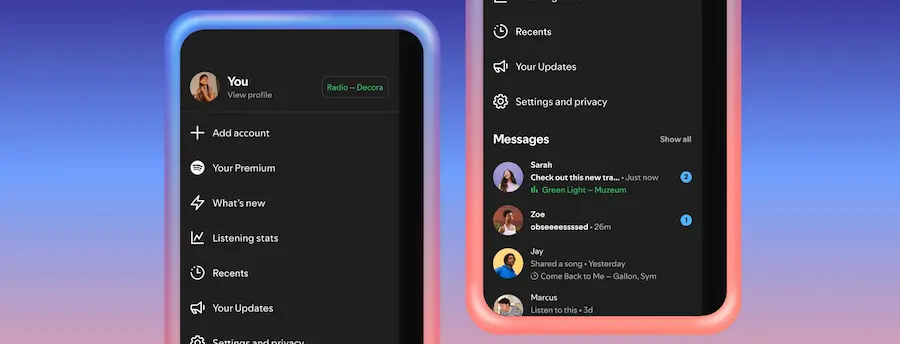

Spotify has been playing at being more than just a player for a while now, because music (and podcasts or audiobooks) isn’t consumed in a bubble: it’s discussed, recommended, and shared. With that in mind, the platform launched Messages last year so sending what you’re listening to wouldn’t require jumping to another app. The numbers backing it up are striking: nearly 40 million users have sent close to 340 million messages since then—a clear sign that people also use Spotify as a “social connector” among friends and family.
Now the company is expanding that experience with two new features inside Messages: listening activity (to see in real time what your contacts are listening to) and Request a Jam (to turn that moment into a shared session). If you’ve ever wondered “are they listening to something right now to talk about?” or wanted to sync a listening session without setting up a separate group elsewhere, this update is aimed exactly at that.
Listening activity: what’s playing, without leaving the chat
Listening activity is an optional (opt-in) feature that shows in Messages what you’re listening to right now. And if you’re not playing anything, it displays your most recently played song instead. The approach is fairly controlled: it’s not broadcast to everyone, but only visible to friends and family you’re already connected with in Messages. In other words, no “broadcasting” your habits to strangers—something that always creates friction when apps get too social.
The privacy logic also has an interesting nuance: you can see other people’s activity even if you haven’t enabled your own, as long as those people have chosen to share it. That matches a very real pattern: some people prefer to look before they share—like joining a conversation to read without posting (yes, we all know someone like that).
To enable it, Spotify says you can do so from Privacy and social settings, accessible from the side panel next to the View profile button. Once turned on, the activity appears both in the chat row in the side panel and at the top of Messages chats, so it’s not buried in a submenu.
What happens if you tap a contact’s listening activity? A set of quick actions opens up: add tracks to your library, start playback, open the track’s context menu, or react with one of the six standard emojis. It’s a small touch, but very much in line with how we use feeds and chats today: see, tap, save, react—no extra ceremony.
And, just to be clear, Spotify reiterates that listening activity is only shared with people you’ve already messaged on Spotify, that you decide which contacts can see it, and that you can disable it at any time. In a world where every privacy setting feels like an endless side quest, keeping it straightforward is appreciated.
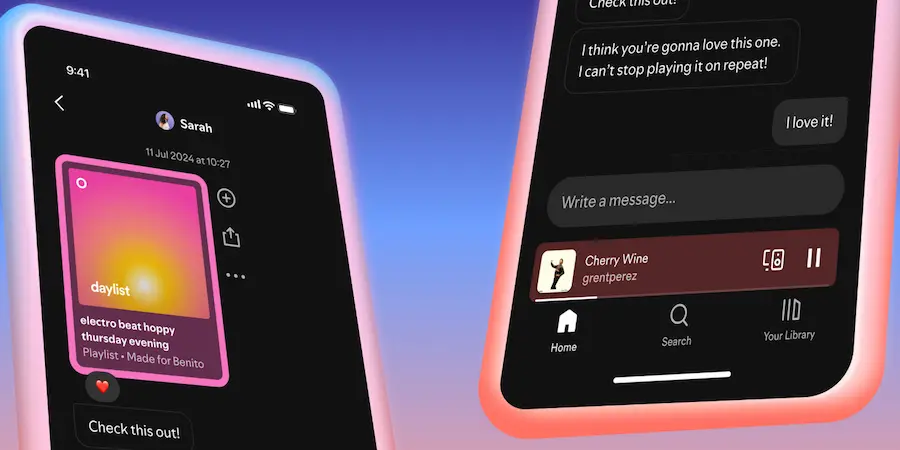
Request a Jam: from “you’re listening” to “we’re listening together”
The second new addition is Request a Jam, designed as the natural next step: if you see someone listening to something, why not turn it into a shared experience on the spot? Spotify already had Jam, and according to the company, its popularity has grown to the point that its daily active users have more than doubled year over year. Even so, there was the typical remote-listening problem: when you’re not physically with the other person, it’s hard to know whether they’re available to sync up.
With this feature, Spotify wants the timing to be more obvious: you can see when someone is listening, join, and also message in sync while the music plays to comment on what’s happening—or what’s coming next. In practice, it’s the kind of detail that makes chat not just an add-on, but part of the listening ritual—very much in tune with an era where even playback queues feel like a social space.
How it works is simple and built into Messages. From a chat, Premium users can tap Jam in the top-right corner to send a remote Jam request. The other person receives the invitation and can accept or decline. If they accept, the recipient becomes the host of the session; from there, both can add songs to a shared queue and listen together.
When a Jam is running, participants see each other’s display name, and suggested songs also appear based on their combined taste profiles. And like any social session worth its name, there’s an exit: anyone can leave the Jam at any time. Plus, pending invites expire if they aren’t accepted within a few minutes, preventing requests from lingering like ghost notifications.
Availability, requirements, and what changes day to day
Both features are rolling out gradually in markets where Messages is enabled, on both iOS and Android, and Spotify expects them to be broadly available in those markets in early February. Listening activity will be available to all users who have access to Messages. By contrast, Request a Jam comes with a subscription nuance: the request is initiated by a Premium user, but Free users can join a session if they’ve been invited by someone with Premium.
There’s also an age requirement: since both features are part of Messages, they’re available to users aged 16 and up. And in the background, Spotify’s stated goal is clear: make listening together easier, while discovery and self-expression inside the app become more seamless.
In everyday use, what matters isn’t just “seeing what others are listening to,” but the combination of signals: first you discover what’s playing in your close circle and, if you feel like it, you turn it into a synced listening session with a shared queue. It’s a small interface change but a big shift in dynamics, because it reduces friction right where plans usually fall apart: coordination. And, if we’re honest, sometimes all you need to start a conversation is seeing that exact track at the exact right moment.


