
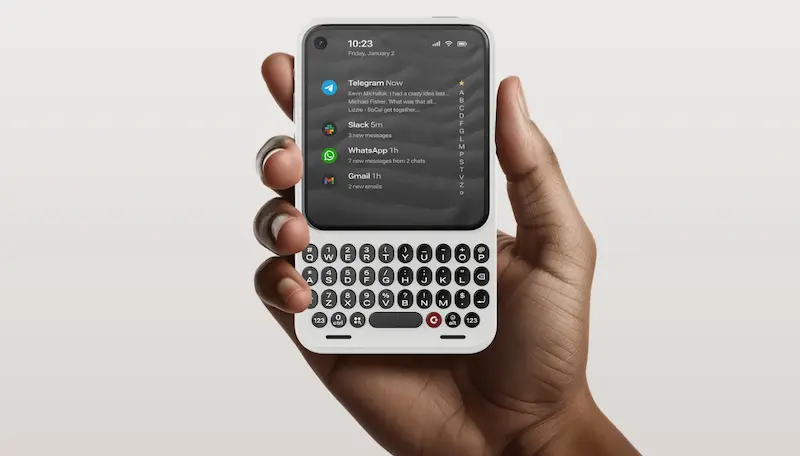

If lately you feel your smartphone pushes you more to consume than to communicate, the return of physical keyboards may sound like a relief… and also like well-placed nostalgia. Clicks, known for its keyboard accessories, has unveiled at CES a new device called Clicks Communicator, a smartphone that openly bets on tactile typing and a messaging-first approach, built on Android 16 and a form factor that recalls the BlackBerry and Palm era, but with clearly modern touches.
The brand’s idea is an interesting one: use it as a second phone “to communicate, not to consume”, keeping your main handset for the camera, social networks, and content creation. That said, does it make sense to carry two phones—and, in many cases, two lines? That’s exactly where the debate sits, because based on its specs and overall concept, the Communicator could also work as a primary device for very specific users.
A smartphone built for typing (and managing notifications)
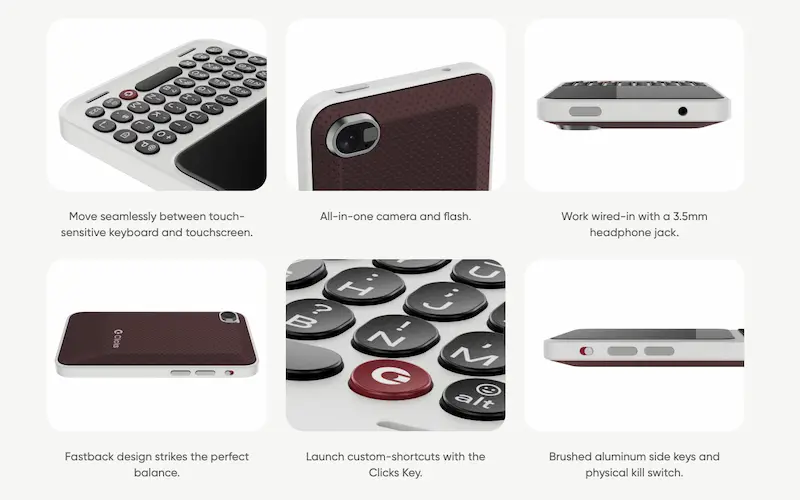
The Clicks Communicator’s defining feature is its physical keyboard, designed to deliver a “premium” typing experience, with ergonomic keys and a pronounced feel that encourages writing without relying on the on-screen keyboard. On top of that, the brand adds features to make the most of the hardware: the keyboard is touch-sensitive so you can scroll through messages, email, or web pages without leaving the typing area, and there’s a shortcut system via the so-called Clicks Key, designed to launch custom actions.
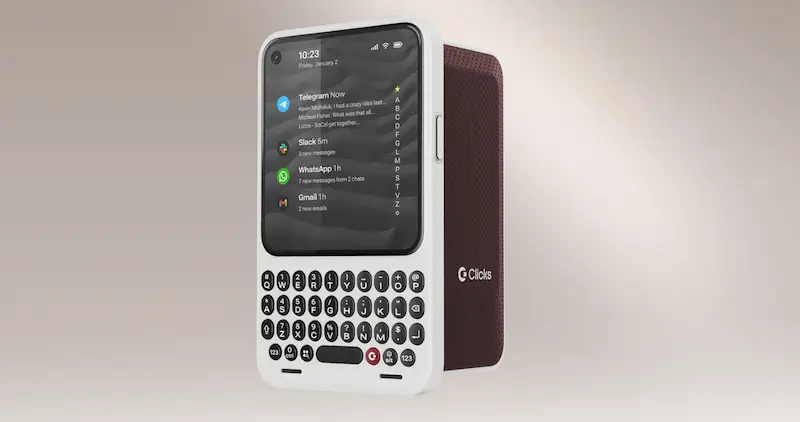
Another interesting point is how it tackles interruptions. Clicks includes a Signal LED, a configurable indicator light that turns on when certain people message you or when specific apps generate notifications. It’s not the first attempt we’ve seen at “taming” notification overload, but here it fits especially well with the idea of a communication-first phone: filtering who and what deserves your attention, instead of opening every alert as if it were a TV-series cliffhanger.
Design-wise, there are also several choices clearly aimed at practicality: it includes a 3.5 mm headphone jack for wired audio, brushed metal-finish sides, and a physical switch (the brand describes it as a kill switch). It also offers interchangeable back covers to tweak the look or feel, and keeps a mix of keyboard and touchscreen so you can move between typing and navigation without friction.
Communicator specs: classic on the outside, very 2026 on the inside
Where the Clicks Communicator makes its ambitions clear is on the technical side, because it’s not just a “dumb phone” for calls and SMS. It features a 4.03-inch AMOLED display with 1080 × 1200 resolution—a compact size that matches the idea of quick communication and one-handed use, while reducing the temptation to turn every free moment into an endless scrolling session.
The operating system is Android 16 and, according to the company, the device is ready for security features such as Android Strongbox and provides hardware-level encryption. As for support, Clicks says it’s committing to 2 years of Android updates and 5 years of security updates, an important detail for a product that aims to be a daily tool rather than a seasonal novelty.
For connectivity, it comes with 5G and support for 4G LTE as well as 3G/2G, plus Wi‑Fi 802.11 a/b/g/n/ac/ax, Bluetooth and NFC with Google Pay support. The phone will be sold unlocked, and it supports nanoSIM and eSIM—key if you truly want to use it as a second phone, or if you need to separate personal and work life.
Battery is another pillar: 4,000 mAh (silicon-carbon) with USB‑C charging and also Qi2 wireless charging. The brand says it’s still too early to promise specific battery life, but that efficiency has been a priority from the design stage, pairing that battery with a modern 4 nm MediaTek SoC aimed at the 5G IoT platform. For storage, it includes 256 GB built in and adds something that’s almost “archaeological” in today’s high end: microSD expansion up to 2 TB.
And yes—even though Clicks insists you should leave “content capture” to your main phone, the Communicator includes cameras that don’t look like afterthoughts: a 50 MP rear camera with autofocus and OIS, plus a 24 MP front camera. No further details are provided, so it’s best not to draw conclusions about real-world performance; in any case, the intent is clearly not to make it a mere emergency device.
Power Keyboard: the keyboard that turns your phone into a Sidekick
Clicks also showcased an accessory for anyone who wants physical typing back without switching smartphones: the Clicks Power Keyboard. It’s a QWERTY keyboard with a number row and directional keys, attaching via MagSafe or Qi2 and adding a 2,150 mAh battery to help keep your phone topped up. The appeal of the format is that it lets you rotate the phone horizontally or vertically, and at certain angles it inevitably echoes the spirit of T‑Mobile’s Sidekick—a gadget many still associate with the golden age of messaging.
Compatibility is broad: it works with iOS and Android and, since it connects over Bluetooth, it can also be used with tablets, smart TVs, and even VR headsets. Pre-orders open on January 2, and it’s expected to launch in spring, with an announced price of $110 (and an early bird price of $80).
As for the Clicks Communicator, it can be pre-ordered for $399, and the price will rise to $499 on February 27. Clicks details a reservation system with a $199 deposit or full payment, with the option to cancel before it becomes an order. The company expects to start shipping later this year, with no final date locked in yet.
The trickiest part is the “second phone” premise: if you want traditional cellular calls, you’ll need a second SIM and a second number; by contrast, internet calling through apps like WhatsApp or Telegram works as it would on any other device. In practice, the Communicator seems built for people who type a lot, want tighter control over notifications, and want to cut down on passive consumption—without giving up a full smartphone. And if your thumb has been asking for a real keyboard for years, this is more than simple nostalgia: it’s a fairly coherent proposition.


