

Eventful week in Cupertino and beyond: Apple has released the 26.2 versions of its systems with urgent security patches, while some users have encountered flickering on external displays after upgrading to macOS Tahoe. There are also hints of an iMac Pro with an M5 Max chip, Apple is pushing immersive content for Vision Pro, and the Computer History Museum has released the source code of Photoshop 1.0. Update now or wait for a more mature release?
iOS 26.2: critical security and controversy over the update
The 26.2 updates come with an ‘install now’ label for anyone on the iOS 26 track: Apple has fixed multiple vulnerabilities, including two zero-days in WebKit that, according to the company, could have been exploited in highly sophisticated attacks against specific individuals in versions prior to iOS 26. A significant privacy leak in Messages is also fixed alongside other bugs spread across several components.
It’s worth highlighting the work of several security researchers Apple credits in its notes; among them Rosyna Keller (Totally Not Malicious Software), who reported problems in MediaExperience, Messages and Telephony, and even claimed that the Messages fix alone justifies updating to iOS 26.2 (or, if you’re still on iOS 18, moving to 18.7.3).
And here’s where the controversy erupts: numerous users report that if your iPhone is compatible with iOS 26 but you’re still on iOS 18, you are not offered iOS 18.7.3, only iOS 26.2. In other words, to receive the patches you must jump to 26 — something many avoid by choice, app compatibility, or rejection of changes like the ‘Liquid Glass’ finish. iPhones that don’t support iOS 26 do receive 18.7.3 and, apparently, iPads are not affected by this limitation. As a temporary workaround, some suggest enrolling in the public beta program and pinning the iOS 18 track so 18.7.3 appears, although that sounds like an unnecessary detour for simple security patches.
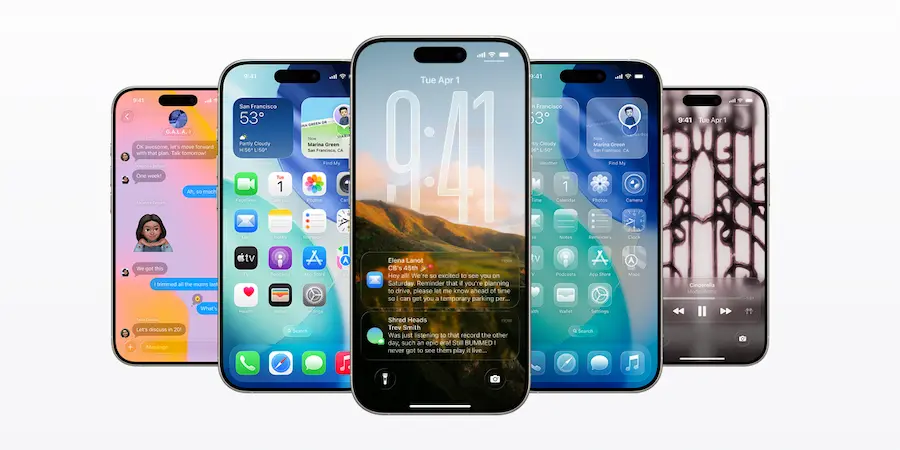
Beyond the fixes, there are new features: iPadOS adds multitasking shortcuts from the Dock (including creating or switching apps in Slide Over and dragging icons to split the screen), iOS allows better customization of the time on the lock screen, and AirDrop gains a method to grant permission with a numeric code. On macOS, ‘Edge Light’ debuts — a white ring that boosts the screen’s brightness during video calls. In short: if you’re running iOS 26, the most sensible move is to do the sudo apt upgrade to 26.2 without hesitation.
macOS Tahoe and displays: the flicker that won’t stop
Since the first macOS Tahoe betas, some users — including specialist journalists — have reported intermittent flickering on external monitors. The most visible cases affect the Studio Display, but there are also reports with other screens, which suggests a system-level bug rather than an issue with a specific panel. Worryingly, the behavior repeats across different Macs: from a Mac mini connected to a Studio Display to laptops with M1 or M4 chips, which makes pinpointing the origin more difficult.
The intermittent nature of the bug turns trial and error into a precision sport. Features like True Tone, Night Shift or automatic brightness have been disabled to try to mitigate it; some believe turning off Night Shift helps, but there is no reproducible pattern and the annoyance returns when you least expect it. In any case, the fact that the issue has gained traction in forums and specialized media is good news: the more attention it gets, the faster corrective patches tend to arrive.
Is your screen starting to ‘flicker’ at the worst possible moment, just when you’re sharing your screen or before clicking ‘Join meeting’? You’re not alone. For now, patience and watching for future Tahoe updates is the order of the day; hopefully Apple will narrow down the bug and squash it in an upcoming release.
iMac Pro in testing, push for Vision Pro and Photoshop nostalgia
Internal code references have revealed the clue every all-in-one fan dreamed of reading: references to an iMac with identifier J833c on the H17C platform, associated with the codename ‘Sotra C’, i.e., the supposed ‘M5 Max’ marketing. In other words, Apple would be testing a high-end iMac with M5 Max. It wouldn’t be the first time a modern iMac Pro has been discussed: Bloomberg already reported in 2023 that an iMac Pro with M2 had been considered and shelved due to costs, and that the idea of a larger model — a 32-inch screen was even mentioned — remained on the agenda. It didn’t arrive in 2025, so perhaps 2026 could be its window. If confirmed, those who prefer a compact desktop instead of a Mac Studio plus external monitor will have reason to smile.
At the same time, Apple is pushing content for Vision Pro, working closely with developers and audiovisual creators. At an event in Cupertino in late October, the company evangelized immersive experiences and best practices, because beyond hardware and software iterations it needs clear examples to show what the headset is truly good for. Apple’s muscle here is key: no ‘killer app’ is born in isolation.
And speaking of legendary software, the Computer History Museum has published, with Adobe’s permission, the source code of Photoshop 1.0.1 (1990) for non-commercial use: 179 files and around 128,000 lines, mostly Pascal (approx. 75%) and about 15% in 68000 assembler. Grady Booch called it mature and easy-to-read code; a true time capsule that shows ‘code is the literature of computing’. If you enjoy leafing through historical commits — even if they’re not in Git — this is pure gold.
Practical geek bonus: if Siri doesn’t understand how you pronounce a name, the iPhone’s contacts have specific fields. ‘Pronunciation First Name’ indicates how the name should be said; ‘Phonetic First Name’ how it sounds to recognize it when dictating; and ‘Nickname’ provides an alternative, although it might be used on screen. In a real case, adding ‘Karen’ as the ‘Phonetic First Name’ made Siri instantly recognize ‘Caryn’. Small trick, big impact — like optimizing an SQL query.
Outside Apple’s garden, we have the electric odyssey of a Volkswagen ID. Buzz driven from Texas to Oregon to save on shipping and get to know the car up close. The story leaves two lessons: the charging map in the U.S. is still an adventure, and however cool they are, touchscreen interfaces and capacitive controls can be overkill at the wheel. In the end, whether it’s an iOS patch or an instrument cluster, technology is something you either enjoy — or suffer — on the road.


